Power Servers are powerful machines that allow you to run enterprise level business functions and processes. They host the RPG langugage and are home to applications needed for the business to run. Many of these programs are run internally by employees for various different purposes, but what if we have data or processes that we want to expose to others through the web? Well the Power Server family can do that too. This guide will walk you through utilizing SQL Stored Procedures, called by a PHP script to read and write data using an RPGLE program, and deliver information back to the page. This will take the form of a deposit-withdrawal program that simulates depositing and withdrawing money at a bank. All the code for this project can be found at my GitHub page.
This guide will assume you have set up your environment to do PHP on a Power Server. If you have not set up your environment, please follow my guide linked here. It will also assume some knowledge of RPG, PHP, HTML, and SQL.
In this post, you will learn how to:
- Write a web page in HTML and PHP for dynamic loading of values on the page.
- Write Stored Procedures that can be called from the web page which will query the database, call RPG programs, and return data to the page that called the Stored Procedure.
- Write an RPG Program that will accept parameters through a procedure interface, accept sent parameters from an SQL Stored Procedure, process those values using an SQL table, and return a value to the Stored Procedure and back to the calling page.
1. Create An SQL Table to Save Transactions.
The first thing we need to do is create a Table that will hold records of our transactions. For this demonstration, we will be keeping things bare bones to explain the concepts in a focused manner. Because of this, we will create a table with only 3 fields. A transaction type field, an amount field, and a transaction time field.
The transaction type field will be a single character field that determines whether a transaction is a deposit ‘D’ or withdrawal ‘W’.
The transaction time field will serve as the key for our table. Because we are tracking the transaction time down to the microsecond, we can assure that this will always be a unique value. If we were to make this a multiple user application, which we may do in the future, we will need to add a UserId field to ensure uniqueness.
Now with some of the explaining out of the way, let’s go ahead and create our table.
Start ACS and open SQL Scripts.
SQL Scripts is included with ACS (Access Client Solutions), it allows for writing and executing SQL statements.
This statement creates a table with three fields that were described before. You will have to input your own library where “YourLibrary” is indicated. It consists of 3 fields that are not allowed to be null, as that would create problems for us if we did.
We have created the TransTime field to have a default value, so an insert using SQL will automatically populate the TransTime field with the current date and time. Because we are using RPG, we cannot pass a null TransTime value on write, so we will have to generate that in our program that you will see later.
We have also created a record format name that differs from the table name as indicated by ‘RCDFMT BAL;’. This is because RPG requires a different record format name than the name of the table to write to the table.
Now, let’s add a little data to our BalanceTab table. This way we can test our Stored Procedure to ensure it is working. Luckily, The i Developer Corner Credit Union deposits $5 when you create an account with them. Let’s run the Insert statement to accomplish this.
If the statement worked properly, you should see a message that says:
“Statement ran successfully (250 ms)
1 rows were affected by the statement”
Let’s see what kind of data we have in our table.
If everything went right, you will see data in your table, with the TransTime field automatically populated with a Timestamp of the current date and time:
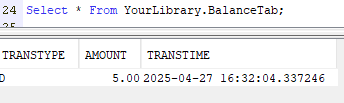
This is due to our default constraint that we added to the table earlier, nice!
2. Write RPG Program to Process Parameters
Now, with the parameters we have, we need to Read and Write to the BalanceTab Table using RPG. Create a new member in YourLibrary called Transact.RPGLE in your QRPGLESRC source physical file, and enter the following code.
1. Line 1 Control Options
- Specifies control options.
*nodebugiodisables debugging for I/O operations, and*srcstmtindicates that source statement numbers should be used.
2. Line 3 File Declaration
- Declares a file named
BalanceTabwith input and output capabilities.
3. Lines 5-7 Variable Declarations
WithdrawalandDepositare packed decimal variables initialized to zero.TransTypeis a character variable used to store the transaction type.
4. Lines 9-14 Procedure Interface Declaration
- This defines the parameters for the procedure interface.
Amtis the amount,TTypeis the transaction type,Balanceis the balance, andMessageis a message string.
5. Line 16 Reading and Processing the Balance Table Via Subroutine
- See Point 10.
6. Lines 18–21: Early Exit for Balance Inquiry
- This allows the calling application (like your PHP form) to retrieve the current balance without modifying any data.
- If the
TType(Transaction Type) parameter is blank (*Blank), it indicates that no transaction (deposit or withdrawal) is being requested — only a balance check is intended. - The program immediately sets
*INLR = *Onto signal end of program execution and release resources. - A
Returnstatement is used to exit the procedure early without performing any transaction logic.
7. Lines 27-38 Transaction Handling and Balance Update
- The transaction type and timestamp are assigned.
- For withdrawals, it checks if the amount exceeds the balance. If true, it sets an error message and ends the program. Otherwise, it writes the balance.
- For other transaction types (deposits), it directly writes the balance. The
Amount,Withdrawal, andDepositvariables are cleared to be calculated again after transaction completes.
8. Line 42 Reprocessing the Balance Table to Recalculate Balances Via Subroutine
- See Point 10.
9. Lines 44-45 *INLR is turned on and Return is executed to end program.
10. Lines 46-57 GetBalance Subroutine
- The program reads the balance table and processes each record in a loop until the end of the file (
%Eof). - For each record, it checks if the transaction type is withdrawal (
'W'). If true, it adds the amount toWithdrawal; otherwise, it adds the amount toDeposit. - The balance is then calculated as the difference between
DepositandWithdrawal.
So now we have the RPG Program written to process the data, let’s compile! The easiest way to do this is to navigate to YourLibrary and type a 14 next to Transact.RPGLE to compile. Otherwise, follow the methods for compiling in your given IDE be it VS Code or RDi.
Now, let’s call the program to test its functionality.

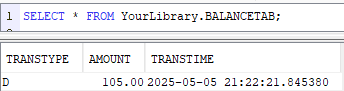
Now, we just tried to deposit 100 more dollars to our account for all of our hard work so far. Let’s check our balance and see if it came out ok!
If everything has gone right, you should get a results like the ones below. Nice!
3. Write the Stored Procedure To Add Transactions to the BalanceTab Table.
1. Line 1 Procedure Name
- The procedure is created within the library
YourLibraryand is namedPROCESSTRANSACTION.
2. Lines 2-5 Parameters
- IN AMOUNT DECIMAL(15, 2): The
AMOUNTparameter is an input of typeDECIMALwith a precision of 15 digits and 2 decimal places. This represents the deposit or withdrawal amount sent in the transaction. - IN TTYPE CHAR(1): The
TTYPEparameter is a 1-character input. This could represent the type of transaction (e.g., ‘D’ for deposit, ‘W’ for withdrawal). - OUT BALANCE DECIMAL(15, 2): The
BALANCEparameter is an output parameter of typeDECIMALthat will hold the resulting balance after the transaction is processed. - OUT MESSAGE CHAR(35): The
MESSAGEparameter is an output parameter of typeCHAR(35)that will store a message, indicating the success or failure of the transaction.
3. Lines 7-10 Attributes
- LANGUAGE RPGLE: The procedure is implemented using RPGLE (RPG IV), a programming language used on the IBM i (AS/400) platform.
- MODIFIES SQL DATA: The procedure modifies the data in the database.
- EXTERNAL NAME ‘YourLibrary/TRANSACT’: This indicates that the procedure is externally defined in the
TRANSACTprogram located in theYourLibrarylibrary. TheTRANSACTprogram is written in RPGLE and facilitates the actual logic of the transaction. - PARAMETER STYLE GENERAL: This indicates that the procedure follows a general parameter style, meaning that the parameters are passed by value or reference depending on the database platform.
Go ahead and run the statement, if done correctly, you should get a message saying “Statement ran successfully”.
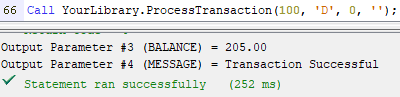
Let’s test our Stored Procedure to see if it properly interfaces with the RPG program. I think 100 more dollars is in order for our hard work.
If everything is going right, you should see a message like the one below!
4. Write the Page to Submit the Request and Receive the Information.
To begin this process, open VS Code. Create a new file and name it ‘Transact.php’ and save it in your PHP root folder, for example C:\php-8.4.1. By saving in this location, you can ensure that your PHP operates as a PHP file when you start your localhost. From here, we will create our form using HTML.
Lines 14–28: Database Connection Setup and Variable Initialization
- A PDO connection is established using ODBC to connect to an IBM i database (
PUB400.com) with provided credentials. - Error handling is configured with
PDO::ERRMODE_EXCEPTIONto throw exceptions on database errors. - Variables are initialized to handle user input (
$amountInput,$amount,$type), system feedback ($message,$balanceDisplay), and the balance value ($balance).
Lines 30–42: Form Submission Handling and Validation
- When a POST request is detected (form submission), the input values are retrieved and sanitized:
$amountRawis trimmed of whitespace.$Ttypeis taken from the form (either ‘deposit’ or ‘withdrawal’).
- The raw amount is validated using a regular expression to allow up to 15 digits and 2 decimal places.
- The transaction type is validated against the allowed values.
- If valid, the amount is converted to a float, and the transaction type is set to
'D'for deposit or'W'for withdrawal.
Lines 44–50: Stored Procedure Execution
- The stored procedure
YourLibrary.ProcessTransactionis called using four parameters:$amount(amount of transaction)$type(either ‘D’ or ‘W’)$balance(passed by reference for output of new balance)$message(passed by reference for output of any system message or error)
- The balance is formatted to two decimal places for display.
- The amount field is cleared on successful transaction to prevent accidental re-submission.
Lines 52–88: HTML Form and Display Output
- A form is rendered with:
- A dropdown menu to select the transaction type.
- A text input to enter the amount.
- A submit button.
- A read-only field to show the updated balance.
- If a message is set (success or error), it is displayed in red below the form.
- Previously submitted values are preserved using
htmlspecialchars()and conditional logic, improving user experience by retaining input upon validation failure.
Recap
You have now written a web page that calls a Stored Procedure on load and presents the user with a form along with their current balance. You have written 2 Stored Procedures, 1 retrieves data with SQL and another takes in 2 parameters updates the database and returns a new current balance value, or an error message. Finally, you have written an RPG program that will take parameters passed in by a Stored Procedure to Read and Write to a SQL table, then return the current balance to the Stored Procedure, which returns the balance to the web page. The only thing left to do is to execute the script and try depositing and withdrawing!
With your localhost open, navigate to your page http://localhost:8000/transact.php and try it out! See that when you try to withdraw more than your current balance, you are given a warning message, and that when you deposit or withdraw, your balance updates accordingly. Finally, see that the form validation prevents you from submitting invalid data.
You should now have a general idea on how to connect RPG to the web. Feel free to adapt and change whatever you want. This demonstration was mostly to get someone comfortable with exposing RPG to the web with the smallest amount of requirements possible.
 The i Developer's Corner